ipcalc Command-Line Cheat Sheet
Anto Mastoroudes
2 min read

Published 18 April 2024
Last updated 19 April 2024
An older guide that hasn't been re-checked yet, so commands or versions may have moved on.
How guides are made and checked
This cheat sheet references some of the most commonly used ipcalc commands. Whether you’re a seasoned professional looking to improve your command-line skills or a newcomer eager to explore networking possibilities through ipcalc, you’ll find valuable insights and shortcuts here.
Installation:
| Distribution | Command |
|---|---|
| Debian/Ubuntu | sudo apt-get install ipcalc |
| CentOS/Fedora/Red Hat | sudo yum install ipcalc or sudo dnf install ipcalc |
| NixOs | nix-env -iA nixos.ipcalc |
ipcalc Cheat Sheet Commands:
| Command | Description |
|---|---|
ipcalc 192.168.0.1/24 | Similar to the above, but for a /17 subnet (255.255.128.0), covering a larger network. |
ipcalc 192.168.0.1/255.255.128.0 | Similar to the above but for a /17 subnet (255.255.128.0), covering a larger network. |
ipcalc 192.168.0.1 255.255.128.0 255.255.192.0 | This computes the network details for 192.168.0.1 with subnet masks 255.255.128.0 and further refines with 255.255.192.0. |
ipcalc 192.168.0.1 0.0.63.255 | This provides network information for using a wildcard mask 0.0.63.255, used in ACLs on Cisco routers. |
ipcalc <ADDRESS1> - <ADDRESS2> deaggregate | Deaggregates a range of IP addresses into smaller network segments for detailed management. |
ipcalc <ADDRESS>/<NETMASK> --s a b c | Splits the specified network into subnets for a, b, c hosts, aiding in network segmentation. |
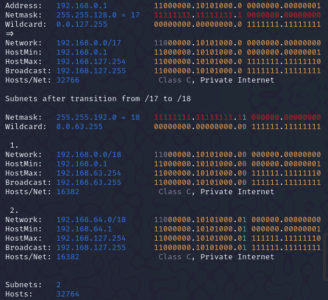
Example output:
Wrapping Up
This ipcalc cheat sheet has highlighted the tool’s flexibility and power for everything from simple tasks to advanced operations. Mastering ipcalc can significantly boost your networking skills. Keep practising, exploring further resources, and share your findings to deepen your understanding and contribute to the community’s collective knowledge.
You may Also Be Interested In
References
The ipcalc manual at https://linux.die.net/man/1/ipcalc.